

Simple Lap Tracking
Student Lap Tracker replaces popsicle sticks, tally sheets and other manual ways of counting laps or timing runs in your run club or PE class. Teachers, staff and volunteers capture the data on the field with our smartphone or tablet scanner app, and it uploads to our Web Portal automatically. No counting. No sorting. From there the system builds detailed reports tailored to your school. Schools that use Student Lap Tracker report increased student motivation, higher participation rates and improved physical fitness testing.
Lap Tracking in 3 Easy Steps
Run
Student ID cards are handed out prior to the start of the PE Class or Run Club. Students run with their ID card in hand, like a baton. Timing uses a group start and a controlled process to prevent the finish line from backing up. Our simple and easy process allows students to remain focused on running.
Scan
At the finish line, students slow down or pause for less than a second, allowing the teacher, staff or volunteer to scan their card using our mobile scanner app. Laps are saved on the device, and automatically synced to Student Lap Tracker as soon as an Internet connection becomes available.
Report
Once lap data has been synced to the Student Lap Tracker Web Portal, it is ready to be used in custom reports and student dashboards branded with your school name, department or activity and mascot. Reports are great for motivation and measuring progress as well as simplifying your grading process.
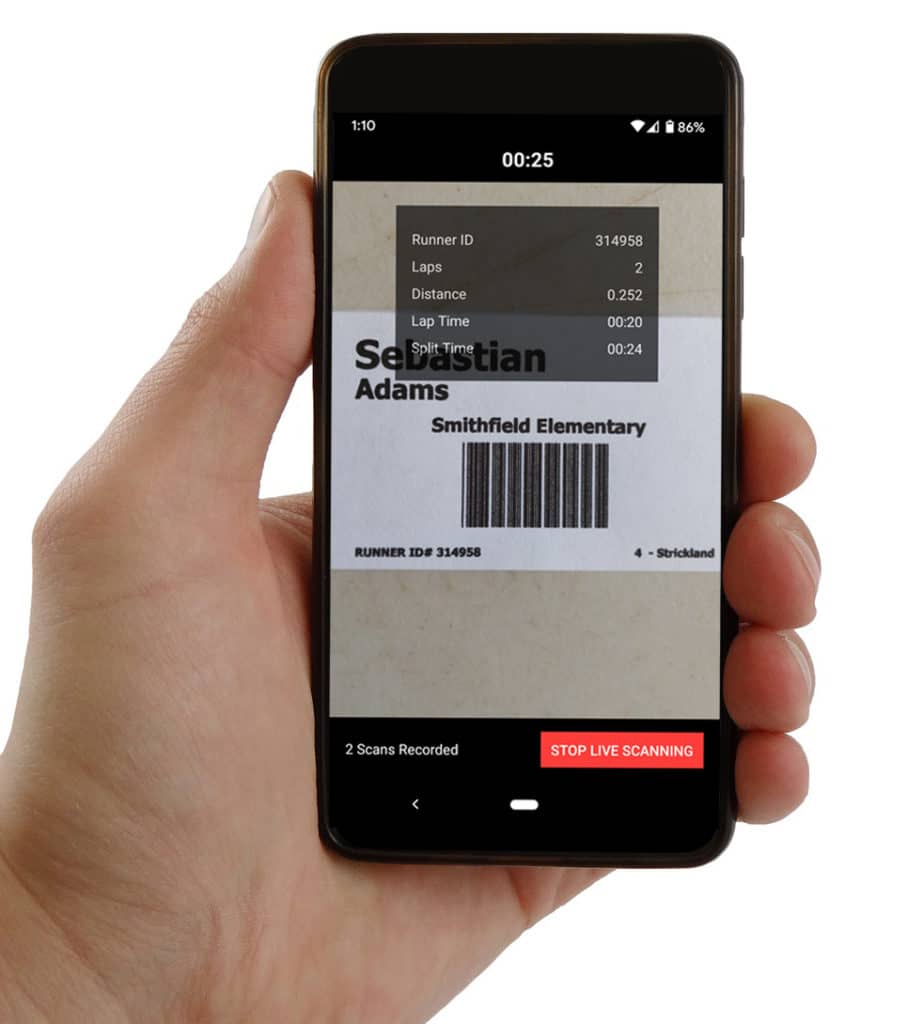
How Scanning Works
Each student is assigned a runner ID card which contains their runner ID and a barcode or QR code. Runner ID Cards are printed and laminated at your school, or purchased from Student Lap Tracker, and can be used all year long.
At the start of PE class or run club, the runner ID cards are handed out to the students who will carry them as they run. The teacher uses the Student Lap Tracker scanner app to start either an untimed run or a timed race. As each student crosses the finish line, they pause for less than a second while the teacher or volunteer scans the runner's card. The app uses the phone’s camera to detect and decode the barcode or QR code, and saves the lap and the time for that student automatically.
Once the activity has completed, the teacher stops live scanning on the scanner app. The scans will automatically upload to our Web Portal without any additional effort once an active Internet connection becomes available on the device.
Reports Show Distance, Awards & Times
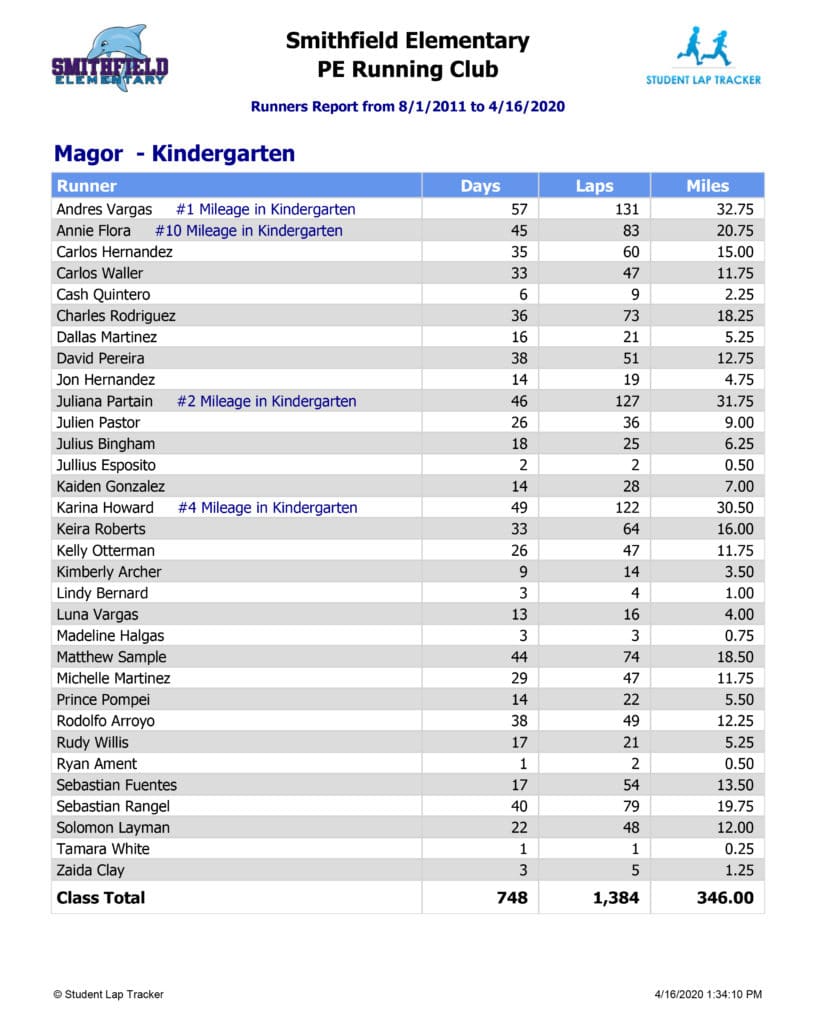
Student Lap Tracker’s customized reports are branded with your school name, your department or activity, and mascot image. Reports can be generated using cumulative yearly totals or custom date ranges to show results for a given race or time frame.
Run as many reports as you want and as often as you need. Reports can be exported to common formats such as Excel, Word or PDF with the click of a button and are easily printed for display in the classroom.
Reports are an excellent motivational tool for students and show runners how they’re improving both individually and as a class. Our most popular reports include Award List, Grade Summary, Runners Report, Top Runners by Grade & Gender, Timed Run with Splits and Timed Run Trend. See sample reports.
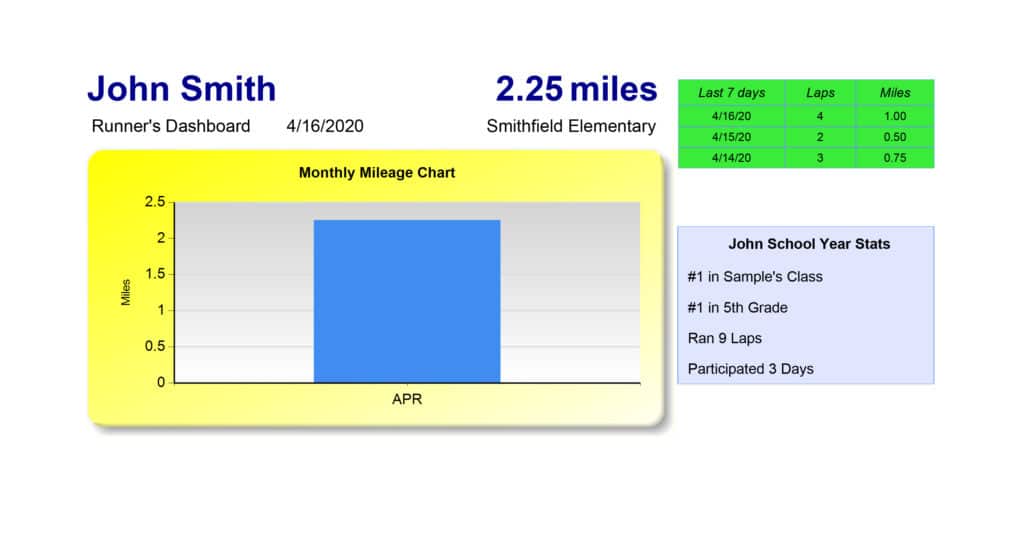
Dashboard Accounts for Family Access
Every subscription to Student Lap Tracker includes unlimited dashboard accounts, so parents and students can log in and see their own data. Seeing their own numbers gives students a share of the responsibility for their activity levels. The school controls access, and there is no self-registration.
How It Works: Common Questions
Q: What happens if the internet goes down mid-scan?
A: Nothing is lost. The scanner apps store every scan on the device itself, so scanning continues normally with no connection at all. As soon as the phone or tablet regains internet access, the saved scans upload to the Web Portal automatically. Many schools scan on fields with no wifi every day and sync later from the classroom.
Q: How long does it take to scan each student?
A: A scan takes a fraction of a second. The app uses the device camera to detect and decode the barcode or QR code automatically, so a single scanner can process a steady stream of runners without a line forming. For large groups or events, additional devices can scan side by side at the same finish line.
Q: What devices work with the scanner app?
A: The scanner apps run on iPhone, iPad and Android phones and tablets you already own. There is no special hardware to buy and no per-device fee — install the app on as many devices as you need. Most iOS and Android devices with a working camera can scan student ID cards.
Q: Who prints the student ID cards?
A: Your school prints and laminates the ID cards using card sheets generated from the Web Portal. Each card shows the student’s name, runner ID and a barcode, and can be reused all year. When we import your class lists during free setup, the cards are ready to print right away. Durable hard plastic runner ID cards are available for an additional per card fee.
Q: What if a student loses their ID card?
A: Replacing a lost card is easy and straightforward: reprint it from the Web Portal and laminate it. The student’s lap history lives in the cloud, not on the card, so nothing is lost. Many schools manage card organization, handing them out before a run and collecting them at the end of the run.
Q: Can parents see their child’s laps and times?
A: Yes. Every subscription includes unlimited dashboard accounts that let parents and students log in and see their own laps, distance and run times. The school controls who gets access, and there is no self-registration, so student data stays private while families can still follow along.
The Same Workflow Across Your Programs
The same run, scan and report routine works for year-round school running clubs, one-day jog-a-thon fundraisers and everyday PE class tracking, including timed mile runs.
Getting Your School Started
Schools outside the United States pay a flat $99 USD per year — every feature included, any enrollment size.